How Wolfgang Meckem used Lumion to connect learning and real-world design
Meet Wolfgang
Project Designer and dedicated Lumion Pro user, Wolfgang Meckem discovered the software in college and has relied on it ever since. From developing his personal portfolio to visualizing professional projects, Wolfgang’s journey with Lumion Pro captures his passion for communicating architecture through striking visuals.
We spoke with him about how he’s integrated Lumion Pro into every stage of his career—from school to real-world application—building out an impressive portfolio of projects that helped him secure a role at a leading architectural, planning, and interior design firm.

-Hi Wolfgang! Tell us a bit about yourself and your current role.
-After growing up on the West Coast and graduating from the University of Oregon’s Architecture program, I wanted to explore and experience a new part of the country, so I moved across the United States to Boston and started working for a firm called Lavallee Brensinger as an Architectural Designer.
I do a lot of architectural work there and specialize in design and visualization, so I regularly use Lumion, Photoshop, and all the tools that make the creative side of architecture so fun.
-At what point did you first discover Lumion?
-I started using Lumion Pro in my sophomore year of college, and that is when I became very interested in visualization. It allowed me to present my ideas the way that I intended to instead of just using BIM programs, and it let me dive deeper into actually showcasing my work.
As I gained interest in Lumion Pro, I started tutoring other students as well, especially in presentation and portfolio creation. Right before I joined my current role, I taught the 3D visualization department of a large real estate marketing firm how to use the software.
-Do you remember the first thing that excited you about using Lumion Pro?
-Materiality, for sure, and being able to adjust it. Putting it into Lumion Pro and seeing the colors, shadows, and materiality, I was thrilled to see that things could work like that! That was my introduction to being enthusiastic about it.
After that, it was the people and atmosphere, and animations, too. I felt able to just immerse myself into the 3D realm and walk through it at a realistic rate. I’m a very detail-oriented person, so being able to look around at every single corner of my BIM model was a huge step in design for me.
“One Lumion Pro feature that’s really changed how I work recently is fill-in clipping planes. It’s made it much easier to bring plans to life in a way that still feels clear and diagrammatic, but with more depth.’’
Wolfgang Meckem
-How long did it take you to get up and running with Lumion Pro initially?
-It was very quick. I took a class, and by the end of it, I had updated all of my previous projects in my portfolio to be renderings from Lumion Pro. It was zero to 100 in a matter of months.
As I gained interest in Lumion Pro, I started tutoring other students as well, especially in presentation and portfolio creation. Right before I joined my current role, I taught the 3D visualization department of a large real estate marketing firm how to use Lumion Pro.
-How are you using Lumion in your work today, and what does your typical workflow look like?
I mostly use Lumion’s solutions for work, but I’ll also open it up for portfolio projects just to keep my creative energy going. My workflow usually starts pretty simply and builds up in layers.
Early on, I lean a lot on diagrams to understand and communicate the core idea of a project before getting too caught up in details.
That’s where Lumion View for Revit comes in. I’ll often strip the building down to a single color so I can focus on how it sits on the site and how the massing reads as a whole. It helps me stay grounded in the concept and not jump too quickly into a fully polished render. From there, once the idea feels solid, I transition into more detailed renders where I can explore materials, light, and atmosphere.
It becomes less about explaining and more about helping someone feel what the project could be like.
One Lumion Pro feature that’s really changed how I work recently is fill-in clipping planes.
It’s made it much easier to bring plans to life in a way that still feels clear and diagrammatic, but with more depth. I can show how a floor plan sits within the full context of the site, which makes things like circulation and the relationship between interior spaces and the landscape much easier to understand. It kind of bridges that gap between a flat diagram and a full render.
And then when it comes to sharing the work, Lumion Cloud has been really helpful. It gives me a straightforward way to present things, gather feedback, and keep everything in one place, so conversations around the design feel a lot more natural and connected.
Explore Lumion Cloud today
It’s free to start and included in all plans.
-How about your personal portfolio—any projects that stand out?
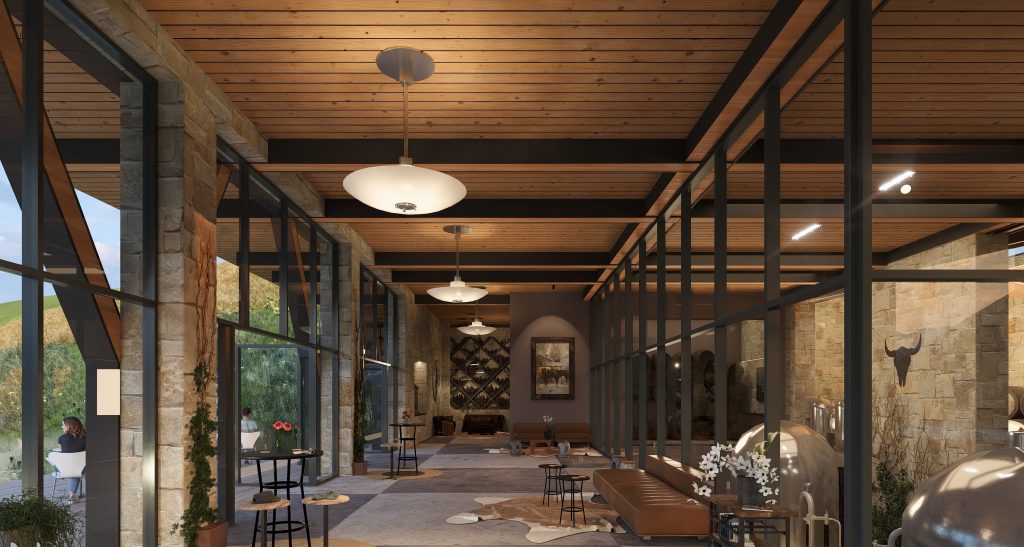
-A particular favorite of my projects is “Hillside Winery,” nestled in the landscape on the shore of Lake Wānaka, New Zealand.
I wanted this building to play a role in the scenery, making its presence known, yet still blending naturally into its surroundings. I love structure and Western art, so you’ll see these themes reflected in my design.
When working on portfolio projects, I’m influenced by the things I enjoy doing and the places I love being. And truly, it doesn’t get much better than drinking wine by a lake in the Southern Hemisphere.
This was completely my own design and it was really fun to not have any restrictions for this project. So I just started playing. I had this vision of a building coming out of the hillside, focusing on structure and fluidity. I landed on it being a winery because my sister Abigail works in the industry, so she helped me lay out the floor plan.
It’s not anywhere close to perfect, but it was fun to try and play with some materialities in an interior setting as well as some lighting and its effects. I really feel that Lumion’s lighting has gotten exponentially better over the past couple years.
To complete this project, I used a combination of Revit, Lumion Pro, and Photoshop.
New to Lumion Pro?
Discover the fastest, easiest way to transform abstract ideas into tangible, client-ready experiences with a free 14-day trial.
-Any other projects that deserve a mention?
-This project—”A+A Residence”—shows how much fun you can have with design and Lumion, let the creative juices flow! For her birthday, I designed my sister’s dream home, inspired by a dinner table conversation where we sketched ideas and imagined the life her family could one day build there.
-You seem to enjoy leaning into the playful side of rendering—is this something you’ve encountered using Lumion Pro?
-Yes, Lumion Pro gives me all the creative freedom I need. Obviously I’ve been using it for years and can pretty much do anything I put my mind to in it, but it is still so satisfying to see my imagination come to life in a render.
So far on the professional side, I mainly make still renders but I have started slowly introducing animations into both my professional and personal design projects. I find that animations can really portray a project to its full potential.
-Looking ahead with Lumion
-Lumion has always felt like a real partner in crime for me when it comes to design, diagrams, presentations, and final renders. It continues to get better every year, and it is always exciting to see what the Lumion team comes up with in each new update. I look forward to continuing to work with Lumion and to creating many more beautiful things with it.
If you want to hear more from Wolfgang subscribe to his newsletter – Thinking in Space. Every Thursday he shares an article exploring the overlooked architectural ideas that shape how places feel.
—–
For reference:
Lumion website link: https://lumion.com/made-with-lumion/interview-with-wolfgang-meckem